AI Chatbot Pro for WordPress and WooCommerce v2.2.4
LatestPowered by ChatGPT Gemini Mistral AI Chatbot Plugin for WordPress WooCommerce Add an AI Assistant to your website that helps visitors find what they need in any language.
Released June 23, 2026 · 604.1 KBby purethemes
3 credits
per install
Subscribe to connect and install
About AI Chatbot Pro for WordPress and WooCommerce
Powered by ChatGPT Gemini Mistral AI Chatbot Plugin for WordPress WooCommerce Add an AI Assistant to your website that helps visitors find what they need in any language. It learns from your site content and gives instant, precise answers. Get Pro Free Download ✨ See it in action How do I reset my password? To reset your password, follow these steps:1. Go to the login page2. Click 'Forgot Password?'3. Enter your registered email4. Check your inbox for a reset link5. Create a new passwordThe link expires in 24 hours. Need help with anything else? Pay Once, Use Forever One-Time Payment Lifetime Updates Free Test how it works Download Plugin Unlimited Conversations Basic Training Sources Customizable Design Chat Conversations History Quick Action Buttons AI Email Tool Extended AI Instructions Send Images or Voice Messages Telegram & WhatsApp n8n, Zapier & Make Remove "Powered by" Label Pro 1 Site $49 One-Time Payment Buy Now Unlimited Conversations All Training Sources Pages, Posts, WooCommerce Products, Custom Post Types, External Sites, PDF Customizable Design Choose between a clean minimal bar, an image, or an animated silk wave effect. Dark and light mode available. Chat Conversations History Quick Action Buttons Buttons with link (e.g. to a page or WhatsApp), predefined question to AI or contact form popup AI Lead CaptureAI can collect the visitor's data like email or phone and send you an email with their question. Extended AI Instructions Image and Voice Messages Allows visitors to attach images or record voice messages when interacting with the chatbot. Telegram & WhatsApp Let users chat with your AI assistant via Telegram or WhatsApp. n8n, Zapier & MakeConnect with external apps via n8n, Zapier, or Make through webhooks. Remove "Powered by" Label Pro 3 Sites5 Sites10 Sites $99 One-Time Payment Buy Now Unlimited Conversations All Training Sources Pages, Posts, WooCommerce Products, Custom Post Types, External Sites, PDF Customizable Design Choose between a clean minimal bar, an image, or an animated silk wave effect. Dark and light mode available. Chat Conversations History Quick Action Buttons Buttons with link (e.g. to a page or WhatsApp), predefined question to AI or contact form popup AI Lead CaptureAI can collect the visitor's data like email or phone and send you an email with their question. Extended AI Instructions Image and Voice Messages Allows visitors to attach images or record voice messages when interacting with the chatbot. Telegram & WhatsApp Let users chat with your AI assistant via Telegram or WhatsApp. n8n, Zapier & Make Connect with external apps via n8n, Zapier, or Make through webhooks. Remove "Powered by" Label Stop Overpaying for Chatbot Subscriptions Compare pricing with competitors 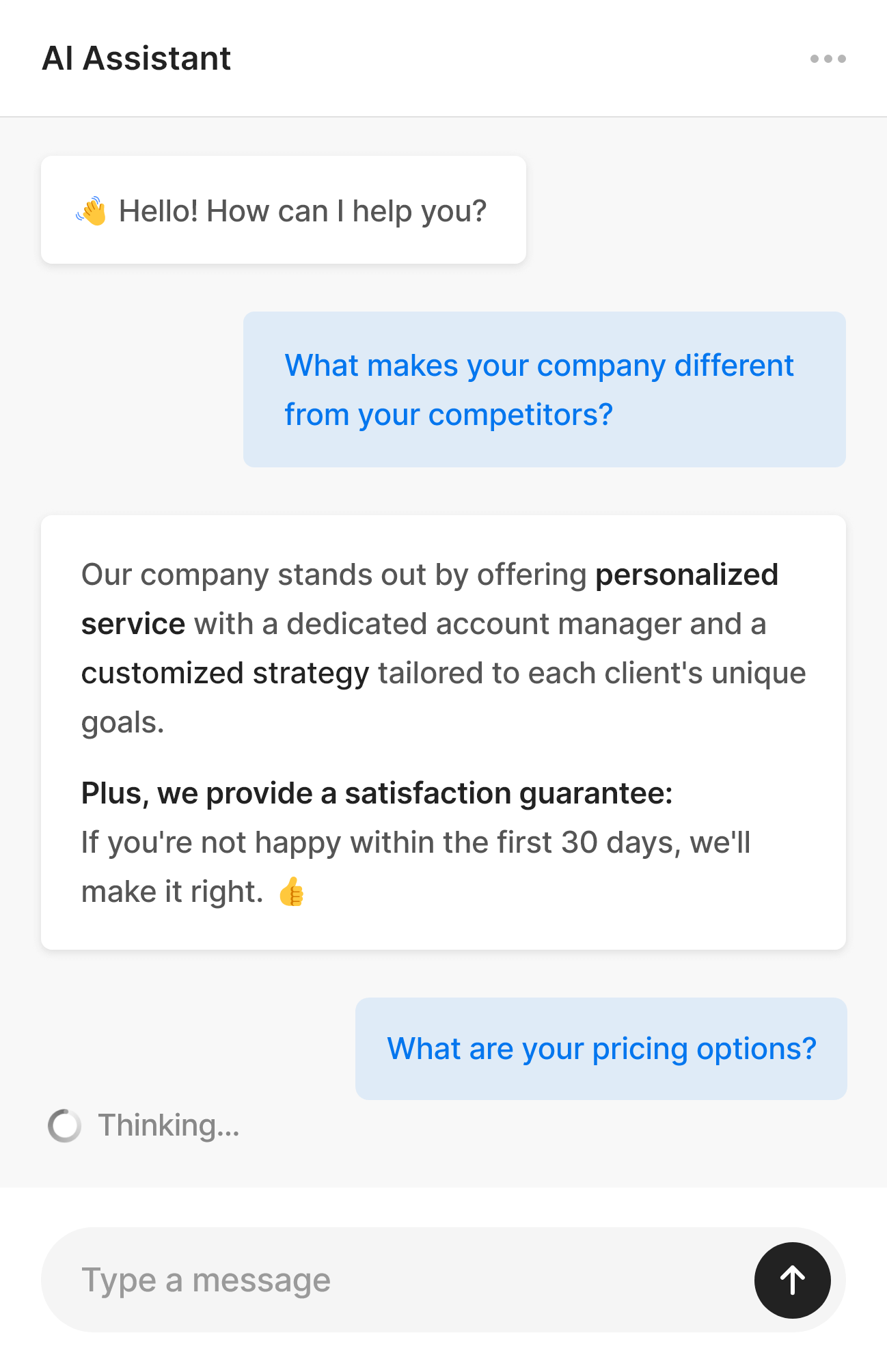 Works with any WordPress theme AI Chatbot Built for
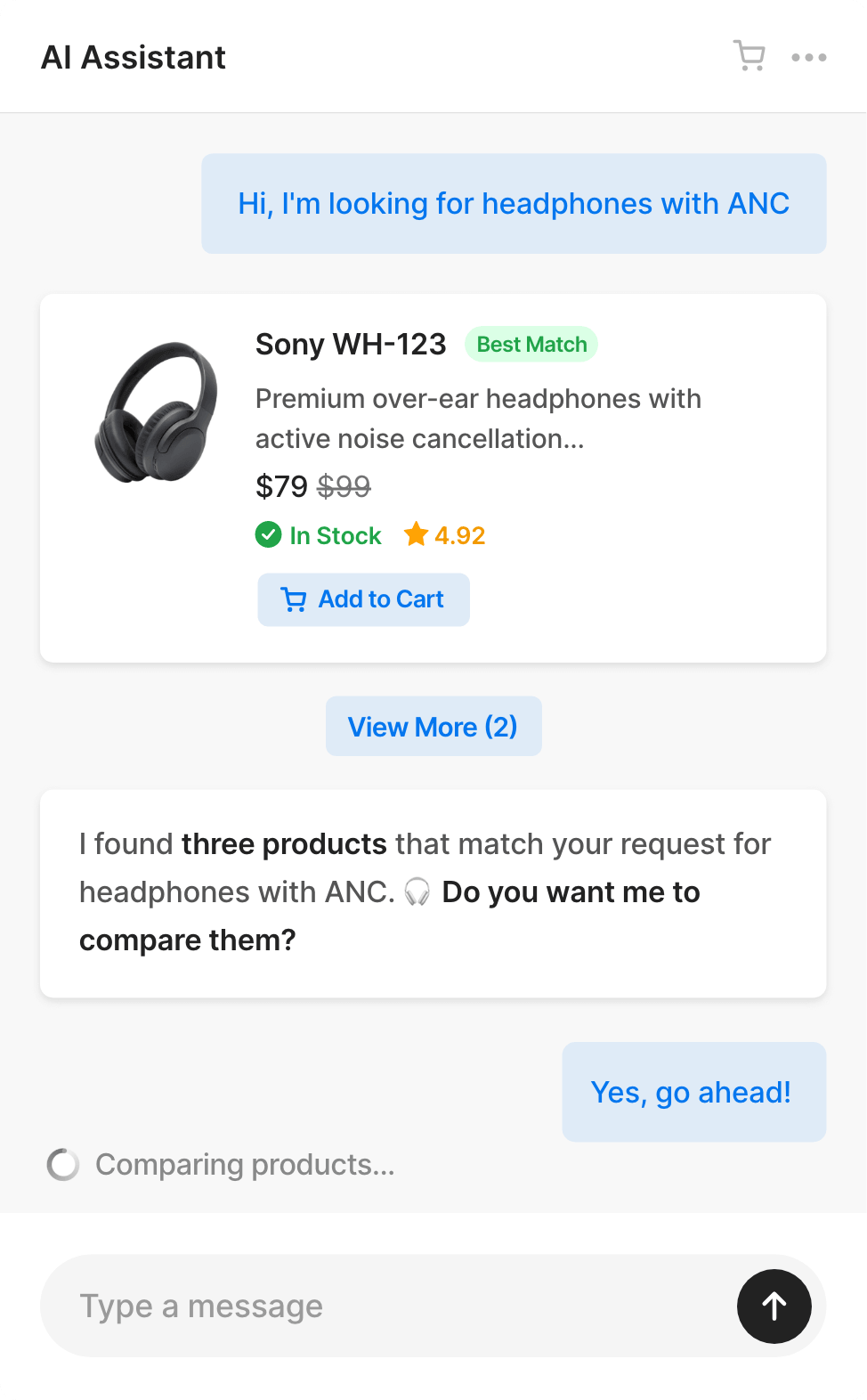
  WordPress Customer Support on Autopilot Let your visitors find what they need, get help instantly, and convert faster with AI that understands your business. Trained on Your Content AI learns from your WordPress site content, Custom Post Types, and uploaded PDFs to deliver context-aware answers. Easy Human Contact Assistant can send emails to you on behalf of users who want to talk to you when chatting with AI. No forms. No friction. This is not just another generic AI chatbot. It is an intelligent AI assistant with a semantic search engine, built natively for WordPress. Pages Custom Post Types Blog Posts FAQ PDF TXT Products Websites WooCommerce Integration AI Shopping Assistant for WooCommerce Running an online store? The AI assistant becomes your shopping advisor and first-line support, actually helping people buy. Our customers report up to 40% fewer repetitive support tickets. Semantic product search Products comparison Add products to cart from chat Filter by category Filter by price and ratings Stock availability Check order status Customers find products faster and get instant order updates - less support work for you, more sales for your store.
  ✨ Custom Instructions 0 / 6000 If user can't find what they're looking for, suggest they contact us on WhatsApp. Our number is +01 123 456 789. If they want to contact us, suggest that you can send an email to me. Ask for their name and email, then send me the message! Please keep a friendly and casual tone, using emojis occasionally. 🙂 Avoid using technical jargon that might confuse beginners. Ditch The Flowchart Use Your Words Forget Complex Logic Trees Instruct your AI assistant with natural language exactly the way you would brief a new colleague. Matches Your Brand Voice Simply tell the AI how to behave. Adjust the tone and personality to ensure it sounds exactly like you want. Bubble & Shortcode Embed Anywhere Add a floating chat widget to every page, or embed the chat directly into your content for a focused, full-screen conversational interface. Style 1 Style 2
  AI Assistant Start a new chat Contact Human How it works? 1 0:00 Contact Us Integrations Connect Your Tools Connect your tools so your agent can read data or trigger actions and let users access your chatbot via Telegram or WhatsApp. Telegram Click to Read Guide WhatsApp Click to Read Guide
  n8n Click to Read Guide
  Zapier Click to Read Guide
  Make Click to Read Guide Compare AI Chat & Search Pro with competitors AI Chat & Search Chatbase.com Chatbot.com Pricing Model One-Time Subscription Subscription First Year Cost $49 $384 $624 Second Year Cost $0 $384 $624 WordPress Native Monthly Messages Unlimited 2000 messages 1000 chats Database on Your Server Adjustable System Prompt WooCommerce Integration Image and Voice Messages Remove "Powered by" Label $39 / month Send Email to Human Integrations (n8n, Zapier, WhatsApp, Telegram) Live Chat Handoff to Human No API key required Stop Paying Monthly Do The Math Pay once - lifetime updates, no subscriptions Use your own API key from OpenAI, Gemini or Mistral AI Cost? Even as little as $5 for ~3,000 messages Edit Content New to API keys? It literally takes 30 seconds to create one 😉 Available AI Providers (Gemini and Mistral offer free tiers) Gemini Open AI Mistral Easy to Use Just add your Gemini or OpenAI API key and you're ready to go. Click "Start Training" and chatbot will learns from your WordPress database and starts answering questions instantly. Download Free Plugin Works with any WordPress theme Unlimited conversations Image and Voice Messages Input Customize tone and add own instructions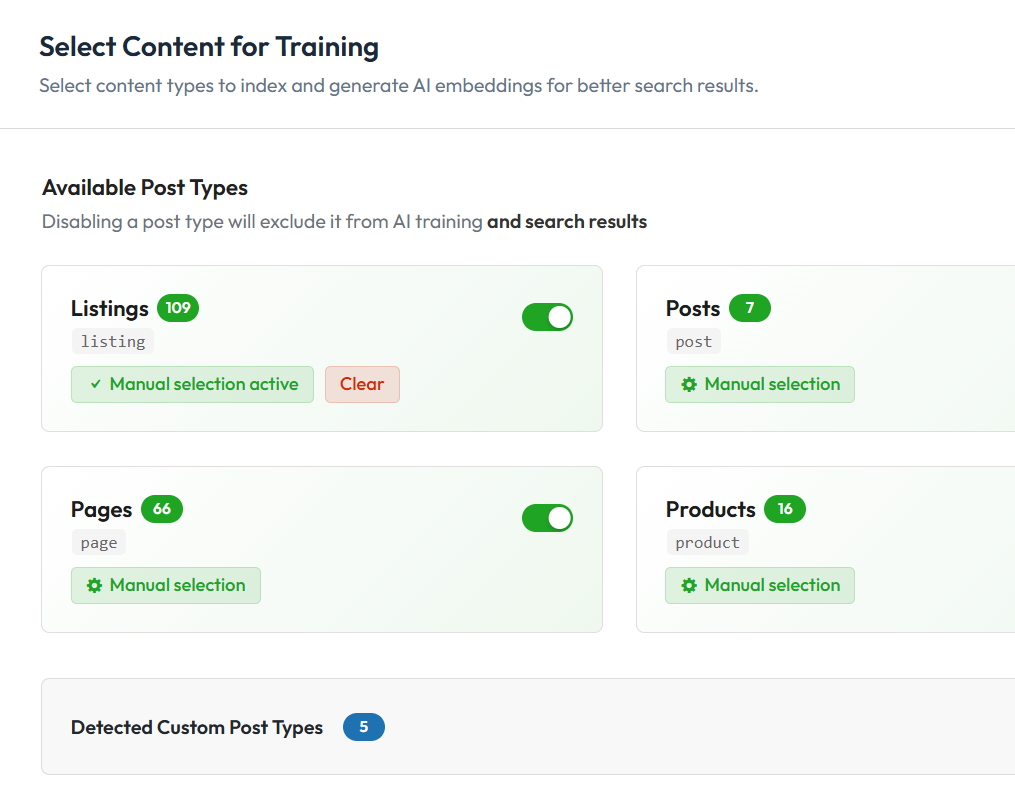
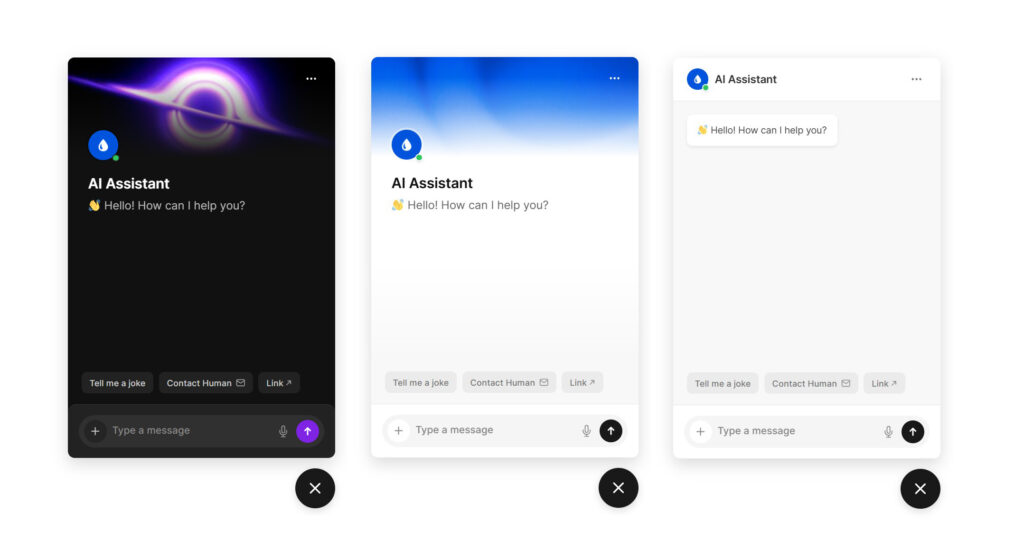
 FAQs Need Help? How to install Pro version that I just purchased? First, make sure you have free version installed.After your order is completed, you'll receive an email with:License keyUse it at https://purethemes.net/license/ to download Pro version and manage active domainsInstall and activate Pro add-on then go to AI & Chat Search → License and paste there your purchase key. Where can I get support? If you need our assistance simply send us message using [email protected] help with setting up plugin? Check How to Add ChatGPT or Gemini to WordPress Website: Step by Step Guide → or this guide for eCommerce owners WooCommerce AI Chatbot Guide → Is design customizable and does it have dark mode? Yes! Our plugin has full dark mode with system-preference detection, per-button color controls, and a floating widget that resizes to fit any layout. Three header modes: a clean minimal bar with welcome messagea custom background image with gradient overlayor a procedurally animated silk wave effect
 How to create API key and how does it cost in API fees? Not sure which AI Provider choose? Check comparison article between ChatGPT, Gemini and Mistral → ChatGPTCheck our video guide. It's literally 2 minutes process.How to Get an OpenAI/ChatGPT API Key→With OpenAI's $5 credit balance (that's minimal amount), you can expect approximately following amount of messages before needing to add more credits.~Up to 2,000-5,000 with GPT-4.1 Mini~Up to 1,000 with GPT-5.2These numbers are rather conservative, approximate and vary based on your custom instructions length, retrieved content for each message (products, pages), and response length.In OpenAI you prepay credits. Gemini bills you after the cycle.Available models: GPT 4.1-mini, 4.1, 5 Mini, 5, 5.1 and 5.2 GeminiHow to Get an Gemini API Key→Total estimated cost for ~1,000 - 3,000 messages using Gemini 3 Flash: $5 on paid tier.Please keep mind that free tier allows only up to 10 requests to AI per minute + training only 100 items per minute.Available models: Gemini 3 Flash, 3 Pro, 2.5 Flash and 2.5 Pro MistralHow to Get an Mistral API Key→Mistral has similar pricing to Gemini and ChatGPT.Available models: Mistral 3 Small, Medium and Large How to improve chatbot replies with a Custom System Prompt? You can add there info about your shop, specific instructions about your website’s focus, target audience, or special features to help the AI provide more relevant and personalized answers to your visitors.Example:IMPORTANT: – This is an online store focused on home and lifestyle products. We sell furniture, decor, and kitchen accessories with worldwide shipping. – If users ask about orders, explain that they can track their order in the “My Account” section or contact support for help. – If users ask about returns, tell them we accept returns within 30 days for unused items in original packaging. CONTACT INFO: - If someone asks you about how to contact us provide him [email protected] and phone +1 123 345 789 - Our customer service hours are 9am–15pm Monday to Friday To improve the AI chatbot’s replies to generic questions like "recommend something for my living room" you need to give him an idea what your website is aboutIMPORTANT: - This is an eCommerce store for home and lifestyle products. We help users find the best items for their home and daily life. - When asked generic questions like "what should I buy" or "what do you recommend", search for matching products from our WooCommerce catalog.In general, prompting is an art – the quality of an AI’s answer depends on the prompt or instructions. Sometimes too many examples can confuse the model, but too few can also lead to poor results.If a user asks for “good headphones” or “good chair,” the AI may auto-apply a rating filter (e.g. 4.5+). If items have no ratings, it may return no results. That’s why you need to tweak prompt on your own and e.g. add: “Don’t apply a rating filter unless the user asks for it.” Why did the assistant answer without searching the site content? Add decision logic to clarify your content types. Universal decision logic is already inside built-in system prompt but you might want to extend it with samples from your website content.DECISION LOGIC: - Question about listings such as [examples] → use search_listings() - Generic products such as [examples] → use search_products() - Generic questions about website content such → use search_universal_content()Use GPT-5.1 or GPT-4.1 instead of GPT-4.1-mini for better quality if you have long custom instructions. Small prompt changes can significantly impact behavior. Is this right for my website? ✅ Runs directly on your WordPress website✅ You control your OpenAI/Gemini API costs✅ Your database stays on your serverNote: MySQL database which WordPress uses, lacks native vector search - all similarity calculations run in PHP so search speed depends on your server CPU and number of indexed items.✅ Optimized for up to a few thousand items/pages/products✅ No external database indexing. Fast setup. Predictable performance.If you’re tech-savvy, check our article on how RAG-powered chatbots work. Does it work with any theme? Yes! It also has full integration with WooCommerce and the Listeo directory WordPress theme. This integration allows displaying product or listing cards directly inside the chat.
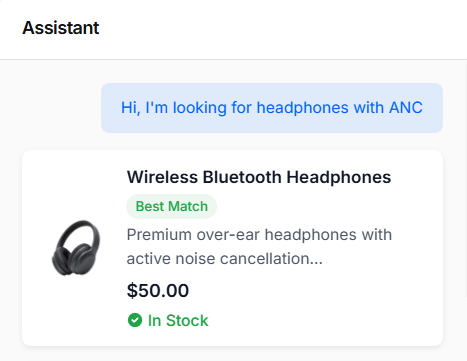 💡Note: Cards in chat are displayed only for WooCommerce products (any theme) or listings (Listeo theme)In other themes, the Pro version can learn from pages/custom post types, but custom post types use a keyword-based search without filters. Full filtering works only with WooCommerce products. What settings and features are available in the plugin? The plugin offers extensive customization through several settings tabs.You can download free version to see it yourself 🙂
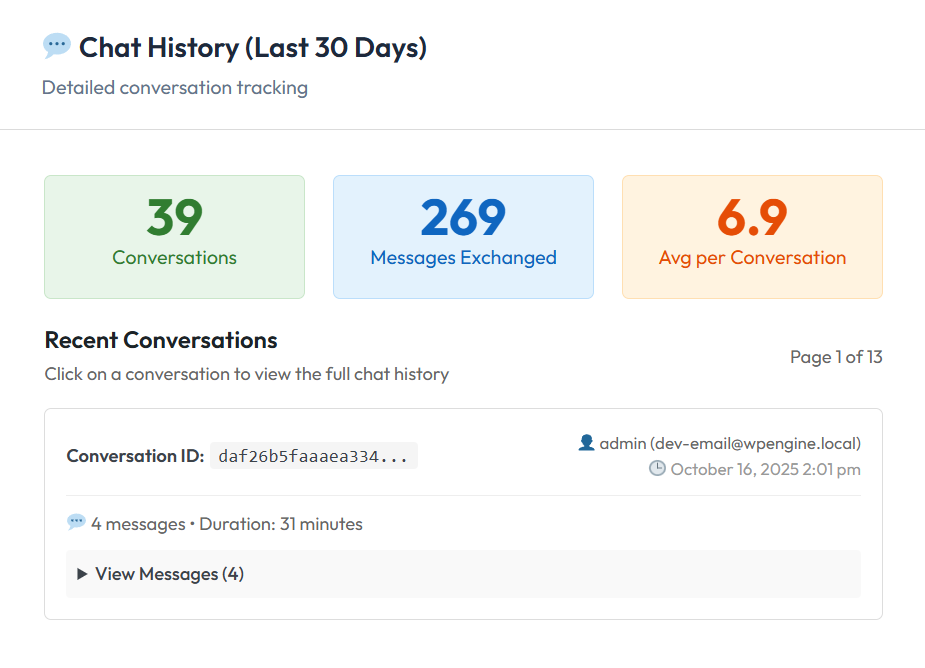
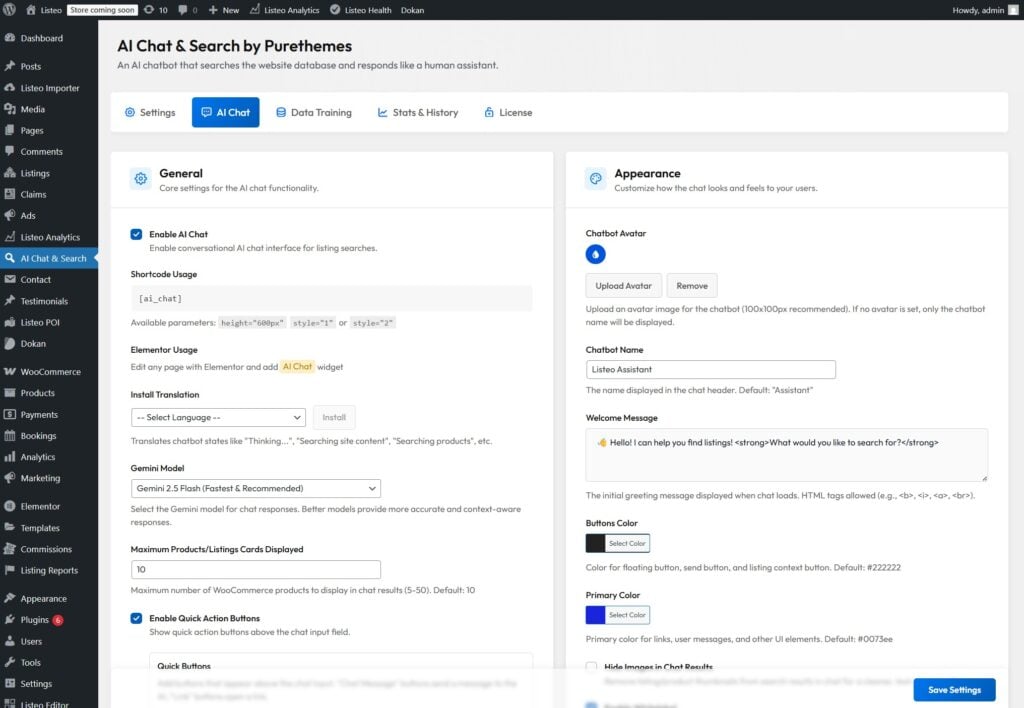 Here's brief summary:GeneralEnable/disable chat, choose AI model (GPT-5.1, GPT-4.1, GPT-4.1-mini and Gemini 3 Pro, 2.5 Pro, 2.5 Flash), set maximum products displayed in results, add quick action buttons above chat input : predefined question to AI, link button (e.g. to a page or whatsapp) and contact form popup)AppearanceCustom chatbot name and avatar, welcome message (supports HTML), brand colors for buttons and UI, option to hide product images in results, whitelabel mode (Pro)Floating WidgetEnable/disable floating chat bubble, custom SVG icon, welcome bubble text, popup dimensions (width/height), hide on specific pagesAI ToolsCustom system prompt (up to 6,000 characters) for business-specific instructions, enable AI-powered email sending on behalf of visitorsAccess & PrivacyRestrict chat to logged-in users only, show terms of use notice, enable conversation tracking (auto-deleted after 30 days)Data TrainingSelect content types to train (posts, pages, PDFs, WooCommerce products, custom post types), manual selection mode, database management tools (check/regenerate/delete embeddings)AnalyticsConversation statistics, popular search queries (7/30 days), email tracking What does Image & Voice Messages do? It allows users to send voice messages (converted to text via AI) and upload images for AI analysis. Audio and images are never stored on your website or database and are sent directly to the AI service. Images are transmitted as base64-encoded data, a standard text-based format for safely sending files.Visitors can attach pictures that help them explain what they’re looking for and help the AI understand it.
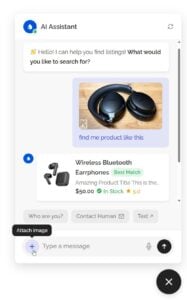 This feature is making it faster and easier for users to share information without typing. GDPR Compliance Features The plugin includes several privacy-by-design features:Terms of Use Notice - Customizable notice users must acknowledge30-day auto-deletion - Chat history automatically purgedData stays on your server - All conversations stored in your WordPress database unlike competitors who keep your visitors conversations on their serversMinimal data to AI providers - Only the search query/message is sent to OpenAI/Google - they don't store your data per their API termsPII-stripped order lookups - When users check order status, personal information (names, addresses, emails, phonenumbers) is never sent to AI providers - only order status, items, and tracking infoWhat data is sent to OpenAI/Google/Mistral?Only the user's message/query and your pages content (for context). No personal data, IPs, or user identifiers are transmitted. Both providers have data processing agreements and don't use API data for training.Which AI provider is best for GDPR compliance? Mistral AI is the most GDPR-friendly option. Unlike OpenAI and Google, Mistral is headquartered in Paris and not subject to the US CLOUD Act, which allows American authorities to access data even when stored on EU servers.Can users request data deletion?For logged-in users, their chat history can be identified by user ID. For guests, data is only linked to a browser session ID and auto-deletes after 30 days. Changelog As you can see in the changelog below, we constantly update and improve our chatbot.1.9.6 - New feature: WooCommerce Cart in Chatbot - Shows "Add to Cart" buttons on product cards and a cart icon in the chat header.cards and a cart icon in the chat header.- Option to adjust AI's user messages memory (how many previous user messages AI sees during conversation), the setting is in Search Quality & Thresholds > Additional Threshold Settings > Conversation Context Length1.9.5 - New feature: Hints for AI - you can direct the AI to use a specific page or document when answering certain questions (option is in AI Chat tab - AI Tools section)- Option to modify floating widget horizontal/vertical position in AI Chat / Floating Widget settings1.9.4 - Performance fix: optimized data training page loading speed for large databases1.9.3 - Added support for GPT 5.4 Mini and 5.4 Nano- New feature: Pre-chat form - collect visitor info before chat; you can add custom fields; data appears in chat history. Enable in AI Chat → Access & Privacy → Pre-chat form (clear cache if using a caching plugin)1.9.2 - Security fixes- WooCommerce products that are not in stock won't be displayed in search results- [time] shortcode that can be added in custom instructions (prompt) so AI knows exact time of your site timezone1.9.1 - WooCommerce variable pricing compatibility- Support for WPC Price by Quantity plugin- GPT 5.4 reasoning effort parameter fix1.9.0 - Added GPT 5.4 and 5.3- Added Gemini 3.1 Flash Lite- Compatibility improvements with page builders (Breakdance, Bricks, Oxygen etc.)1.8.9 - Option to align floating widget to the left or right side- Added Gemini 3.1 Pro (replaces 3.0 Pro which will be disabled by Google on 9th March)1.8.8 - Minor Fixes1.8.7 - WooCommerce fixes (AI uses price with tax + can fetch shipping number)- Documents embedding optimisations- Option to disable custom fields in embeddings1.8.6 - Webhook Automation (e.g. N8N, Zapier, Make)- WhatsApp Integration (via Twilio)- Telegram Integration1.8.5- Option to add background image in chat header (Floating Widget → Initial Header Style)- Option to modify each Quick Button color1.8.4 - Security improvements: centralized IP detection preventing IP spoofing via header injection and XSS prevention improvements- More details about user when hovering over IP address in chat history1.8.3 - Translations for all plugin settings in WordPress admin- In the chat history, each user message shows the page it was sent from1.8.2 - Added dark mode (color scheme setting)1.8.1- Improved compatibility with Divi page builder1.8.0 - Added product/listing comparison tool — after searching, you can ask the AI to compare X and Y.1.7.9 - AI responses with a smooth word-by-word typing effect- Menu in chat window with start new chat and expand window options1.7.8 - External page sources – chatbot can be trained with content from external web pages1.7.7 - Added SKU and EAN/GTIN codes to WooCommerce product embeddings1.7.6 - Admin user interface improvements1.7.5 - Additional training document formats (txt, md, csv, xml)- Chat conversations activity visual graph1.7.4 - Added Mistral AI Provider1.7.2 - Embedding generation optimization for non-lating languages (Cyryllic, Greek)1.7.1 - Image Uploads & Voice Messages1.7.0 - Vector search speed optimization 1.6.9 - Enhanced user IP-based rate limiting (max messages per 1 minute / 15 minutes / day)1.6.8 - Couple of minor improvements1.6.7 - Option to block specific user IP from accessing chatbot- Option to change AI loading icon animation style1.6.6 - Improved compatibility with popular WooCommerce themes- Improved auto-detecting language from user messages1.6.5 - Security fix- User IP and country display in chat conversation history Send us an email We will reply within few hours! Edit Content Try Before You Buy Try all Pro features on your site for 3 days. No credit card, no commitment. Edit Content Request Trial AI Chat & Search Pro We will grant you a trial license active for 3 days. You can test the chatbot yourself before purchasing. 🙂